Another day another new iPhone application. Today it was EveryTrail.
In the past I used my Garmin Etrex as a GPS and a regular camera, by fiddling with LoadMyTracks, HoudahGeo and Flickr I managed to upload my walks to Everytrail. Today it all changed 🙂
Here is my test walk around Cambridge with the iPhone:-
cambridge station walk
Widget powered by EveryTrail: GPS Geotagging
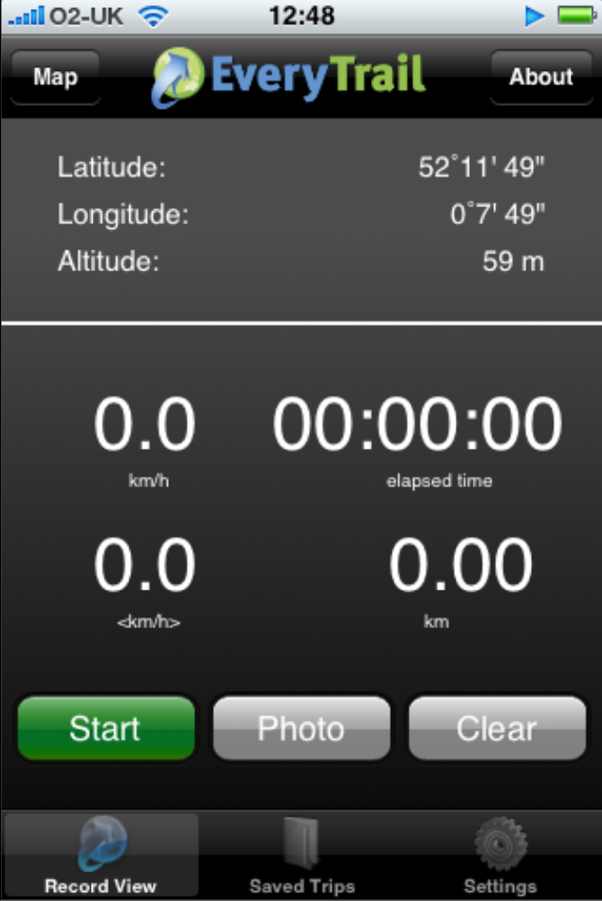
On the iPhone the application looks like this, very intuitive to use, give it your login name ad password then just walk and take pictures. It isn’t using the cell networks or WiFi so these can be switched off. I didn’t and the iPhone battery was dead in about 2 hours 🙁
Battery life is a real issue with all these new applications, it means its a playphone rather than a real tool for saying doing day long hikes.
Other than that its a great little application – the log was uploaded over WiFi in a few minutes at home.
It could be improved by having the screen shut off and some positive indication that it is locked to the satellites, maybe buzz if it loses the GPS signal. A screen showing satellite positions and strengths would be cool too. I also noticed that it lost the Altitude data when transferring to Everytrail – not so bad in Cambridge but annoying on a mountain walk.
Apologies for poor image quality – obviously a sticky finger left some traces on the camera lens – a snag when you have to hold the phone for so long!
A good free application that is really only limited by the poor iPhone batteries and satellite receptio.
Powered by ScribeFire.

now that is cool i am very impressed ..all pics in right place too. A great app for the iphone 🙂
I think it is very cool too. I’m just going to check out some walks for this Sunday.
Interesting! In response to heavy battery use try these – (EXTERNAL RECHARGEABLE BATTERY PACK (2200mAH) FOR APPLE IPHONE + SILICON CASE) on Amazon for £15 but smaller packs on Ebay go for £10.
I recently downloaded the app, Worked great. There a few kinks, but being that it worked the first time I used it, can only mean it will get better with time. I did a 3 mile hiking loop under tree cover, and it picked up the entire trail loop. The only down fall is not being able to go into Everytrail and copy and pasting your widget into your own web site. When iPhone does that, then this app will truly rock. Of course that is Apples problem.
Does the iPhone use satellites for GPS or triangulation from the base stations? Where are the satellite detectors on the phone? Enjoy the walk.
Very cool. Will have to Blog about this once I get the app on my wife's iPhone (she doesn't know yet).
2 hour battery life? Definately something wrong there! I don't even bother switching off wifi and I get 4-5 hours or so. Mind you – I don't have 3G data connection sucking the life out of the battery.
great article!, grats for u site 🙂
i have tried this app and its really working great for me
a celphone and an itouch is cheaper.
You truly rock Geoff!
it's indeed a great application, I am totally impressed with it's working, thanks a lot for the post!
Battery life:
OK, I did a quick test of the app and if you manually press the slep button non top of the phone the screen turns off. When you turn on again you slide the lock key and it returns to the Everytrail app which appears still to be running. That means you should be able to save quite a bit. ANother tip is to turn screen brightness down to the minimum you can handle.
Also, if you jailbreak you can install an app that gives a drop down access from any screen to toggle 3g, wifi, screen brightness etc. Its called SBSettings
Battery life:
OK, I did a quick test of the app and if you manually press the slep button non top of the phone the screen turns off. When you turn on again you slide the lock key and it returns to the Everytrail app which appears still to be running. That means you should be able to save quite a bit. ANother tip is to turn screen brightness down to the minimum you can handle.
Also, if you jailbreak you can install an app that gives a drop down access from any screen to toggle 3g, wifi, screen brightness etc. Its called SBSettings
Wow thanks for the great review. Sometimes it is really hard to choose some applications for iPhone because there exists a huge variety of those. I am searching for some app related to GPS and distance – meter so I think EverTrail will perfectly fit my requirements. Thanks one more time for posting this here. I will be waiting for other great posts from you in the future.
Sincerely,
Tim Howard from iphone application development
nice post